
Download Folx Torrent Client – Fast, Secure & Free Torrent Downloader
Overview – Why Folx Torrent Client Stands Out
Folx Torrent Client, created by Eltima Software, is a free, cross‑platform torrent downloader that blends speed, reliability, and an intuitive interface. While seasoned users may be familiar with powerhouses like qBittorrent or Transmission, Folx aims to lower the learning curve for newcomers without sacrificing the performance that power users expect. The client handles both classic .torrent files and magnet links, automatically resumes interrupted downloads, and integrates directly into popular browsers for one‑click adding of torrents.
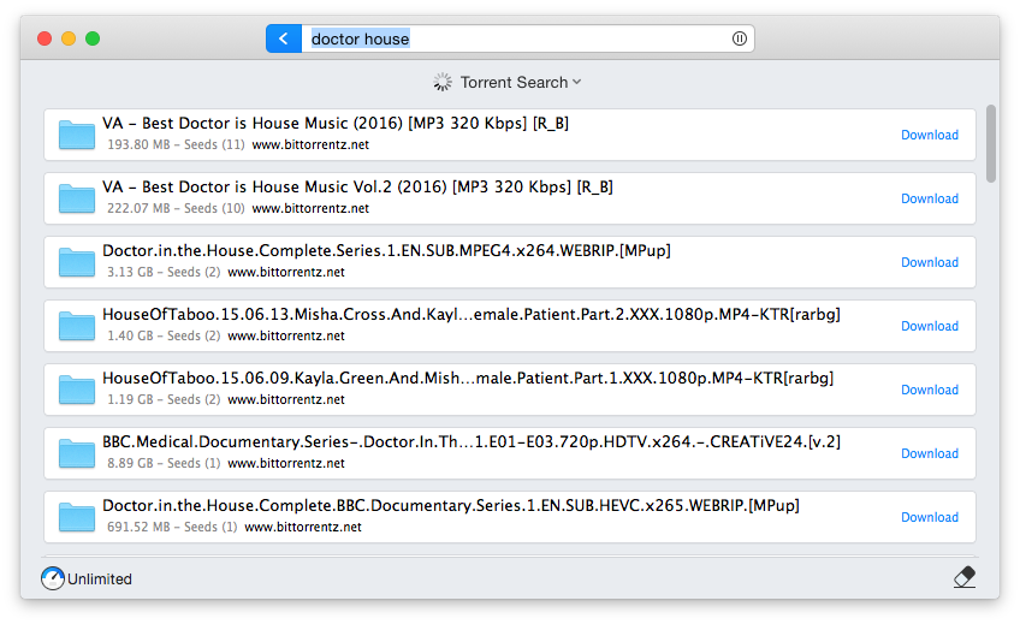
Folx also supports proxy servers, giving users a layer of anonymity and security when sharing files over peer‑to‑peer networks. Its design focuses on maximizing bandwidth usage: the software can split a single download into multiple threads, allowing simultaneous connections to several peers, which often translates into faster completion times. For those who need deeper control, a paid Pro version unlocks advanced options such as speed throttling, scheduling, and a built‑in torrent search.
In the crowded torrent client market, Folx differentiates itself by delivering a polished, beginner‑friendly experience while still offering the performance‑driven features that serious downloaders look for.
Key Features & Compatibility
- Browser integration for Chrome, Firefox, Safari and Edge – add torrents with a single click.
- Full support for .torrent files and magnet links.
- Auto‑resume capability that restores interrupted downloads without user intervention.
- Multi‑threaded downloading to boost speed on high‑bandwidth connections.
- Smart Tagging – automatically organize finished files into folders based on user‑defined tags.
- Proxy and SOCKS5 support for enhanced privacy.
- Speed scheduler (Pro) – set download/upload limits for specific times of day.
- Built‑in torrent search (Pro) – find popular torrents without leaving the client.
- Lightweight UI with dark and light themes.
- Cross‑platform support for macOS, Windows, and iOS/Android via companion apps.
Compatibility: Folx Torrent Client runs natively on macOS (10.13 and later) and Windows 10/11 (64‑bit). While the desktop version covers the majority of users, a companion mobile app is available for iOS and Android, allowing you to monitor and control downloads remotely. The software adheres to macOS sandboxing rules, ensuring that it does not require elevated permissions beyond what is needed for network access and file storage. On Windows, the installer registers the .torrent file association automatically, and the client can be set as the default torrent handler during setup.
Installation & Usage – Getting Started in Minutes
Step‑by‑Step Installation
- Visit the official Folx website and click the “Download for macOS” or “Download for Windows” button, depending on your OS.
- Save the installer package (.dmg for macOS, .exe for Windows) to your computer.
- Run the installer and follow the on‑screen prompts. macOS users will need to drag the Folx icon into the Applications folder, while Windows users click “Next” through the wizard.
- During installation, you’ll be asked whether Folx should become the default program for .torrent files and magnet links – enable this for seamless integration.
- After the installation completes, launch Folx. The first‑time setup wizard will ask you to choose a download folder, enable browser extensions, and optionally configure a proxy.
Basic Usage Tips
Once Folx is running, adding a torrent is as easy as dragging the .torrent file onto the main window or clicking the “+” button and pasting a magnet link. The client will display a summary of the files, peers, and estimated download time. By default, Folx allocates the maximum number of connections based on your network, but you can manually adjust thread count in the preferences if you experience instability. The “Smart Tagging” feature lets you assign tags such as “Movies,” “Games,” or “Documents.” When a download finishes, Folx automatically moves the files into the appropriate folder, keeping your library tidy.
For power users, the Pro upgrade unlocks a scheduler that lets you set download windows (e.g., 02:00‑06:00) and bandwidth caps, helping you stay within ISP data limits. The built‑in search (Pro) provides quick access to popular torrent indexes, removing the need to visit external sites. Regardless of whether you stick with the free version or upgrade, Folx’s clean UI and responsive controls make managing multiple torrents straightforward.
Pros, Cons, FAQ & Final Thoughts
Pros & Cons
- Pros:
- Highly intuitive UI – ideal for beginners.
- Fast multi‑threaded downloading maximizes bandwidth.
- Automatic resume and smart tagging keep downloads organized.
- Browser extensions streamline torrent addition.
- Cross‑platform support with mobile companion apps.
- Cons:
- Advanced features such as scheduling and built‑in search require the paid Pro version.
- Less extensive customization compared to open‑source clients like qBittorrent.
- No native Linux version (users must rely on alternatives or Wine).
Frequently Asked Questions
Is Folx Torrent Client truly free?
Yes, the basic version of Folx is completely free and includes core torrent downloading, auto‑resume, and browser integration. Advanced tools are part of the optional Pro upgrade.
Can I use Folx on Linux?
Folx does not have an official Linux client. Linux users can run the Windows version through Wine, but for native support, alternatives like qBittorrent or Transmission are recommended.
How does the Pro version improve privacy?
Pro adds built‑in proxy and SOCKS5 configuration, allowing you to route torrent traffic through a secure server. This masks your IP address from peers, enhancing anonymity.
Does Folx limit download speed?
The free version uses all available bandwidth by default. In the Pro edition you can set upload/download caps and schedule throttling to stay within ISP limits.
Is the software safe from malware?
Folx is developed by Eltima Software, a reputable company with a long history of producing clean utilities. The installer is digitally signed, and regular updates address security vulnerabilities.
Conclusion & Call to Action
Folx Torrent Client delivers a compelling blend of speed, simplicity, and modern features that appeal to both newcomers and seasoned torrent enthusiasts. While the free edition covers the essentials—fast downloads, auto‑resume, and seamless browser integration—the optional Pro upgrade unlocks powerful tools for privacy, scheduling, and discovery. If you value an elegant UI and hassle‑free setup on macOS or Windows, Folx is a solid choice that rivals more complex open‑source alternatives. Ready to experience a smoother torrent workflow? Download Folx Torrent Client now and start downloading with confidence.







